
Blog
DTF Printing Explained: What It Is & How to Print Transfers | MAG Digitizing

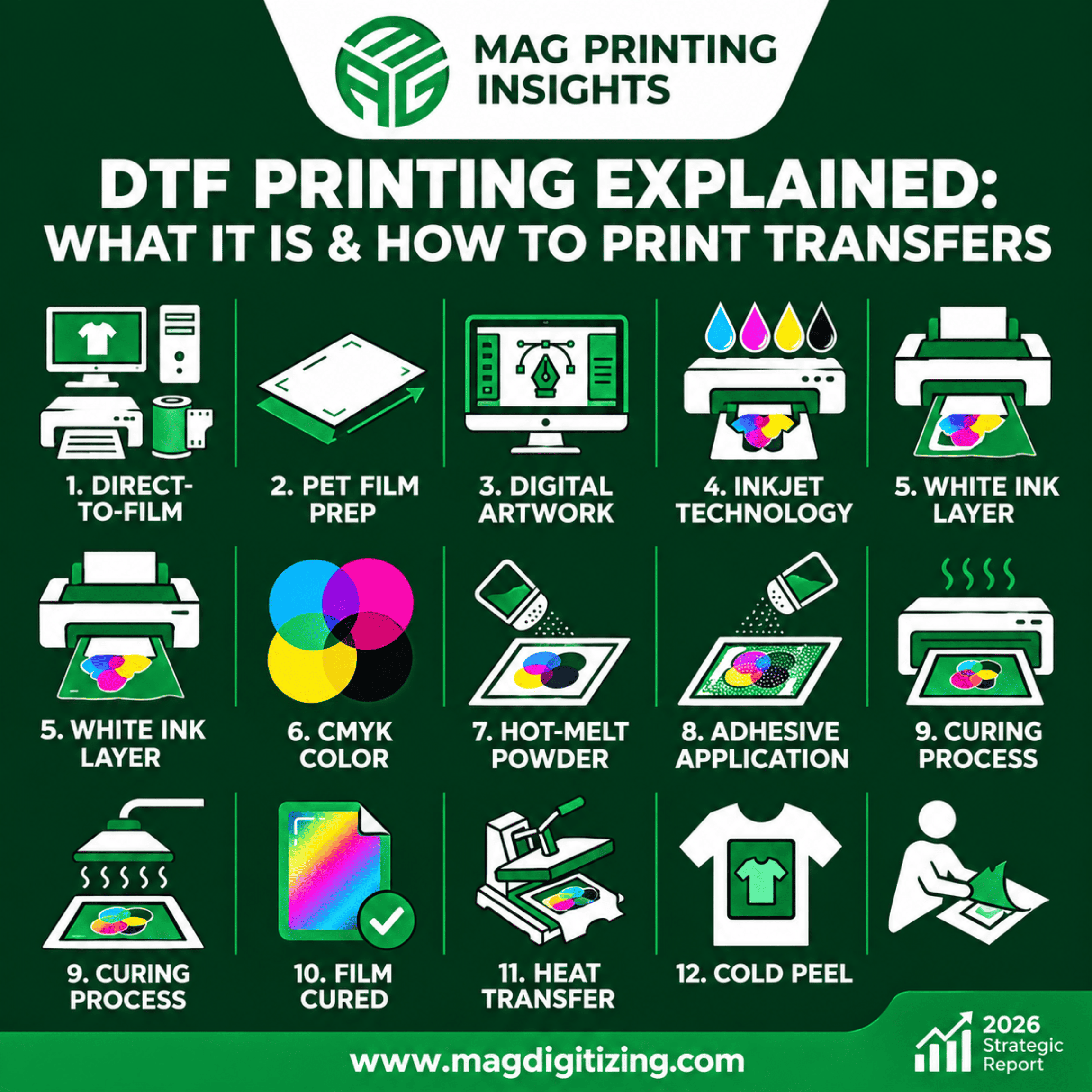
DTF Printing Explained: What It Is & How to Print Transfers
Ask ten print shop owners what they added to their setup recently, and at least half will say DTF. There’s a reason for that. It’s fast to learn, it doesn’t fuss about fabric, and the prints look great.
We hear about DTF at MAG Digitizing almost daily. Clients send us artwork and ask, “Will this work as a DTF transfer?” Most of the time, yes. But the results depend on how well you handle each step. So let’s go through the whole thing properly.
So, What Is DTF Printing?
DTF means Direct-to-Film. You print your design on a thin sheet of PET film, cover the wet ink with hot melt powder, melt that powder, and then press the film onto a garment with a heat press. Peel the film off and the design stays on the fabric.
The design never gets printed on the garment itself. That’s the whole trick. Because the transfer carries its own adhesive, it sticks to cotton, polyester, blends, nylon and even some leather, and you don’t need to pre-treat anything.
Why Everyone’s Switching to DTF Transfers
- One process, many fabrics. No need to change your method for every shirt.
- Dark garments are easy. The white ink layer keeps colors bright on black and navy.
- It feels soft and holds up. A good transfer stretches with the fabric and survives plenty of washes.
- No weeding. If you’ve ever picked tiny vinyl pieces with tweezers, you’ll appreciate this one.
- You can print ahead. Make a batch of transfers, store them, and press when an order comes in.
How to Print DTF Transfers, Step by Step
1. Set up your DTF workflow
You need a computer, a DTF printer, PET film, DTF inks and powder. Nothing fancy. But cheap or mismatched supplies cause most of the headaches people complain about, so start with a decent kit.
2. Prepare the PET film
The film has one coated side, and that’s the side the ink goes on. Load it the wrong way and the print won’t transfer properly. Check before you hit print. It takes five seconds and saves a full sheet.
3. Get the artwork ready
Your file decides your result. Aim for 300 DPI at the final print size and use a transparent background so you don’t get stray edges. A blurry file gives a blurry transfer, no matter how good the printer is. If your design needs cleanup or redrawing, this is where MAG Digitizing can help.
4. Understand the inkjet side
A DTF printer is an inkjet machine, so it behaves like one. Print heads clog if you ignore them. Run a nozzle check every day, and keep the machine in a room that isn’t too dry or too hot.
5. Print the white ink layer
The white goes down as a base under the colors. It makes the design opaque, so what you see on screen is what you see on a black shirt. White ink also settles over time, so shake or circulate it as your printer’s manual says.
6. Print the CMYK colors
Cyan, magenta, yellow and black build the actual image. Use the right ICC profile. Without it, reds turn orange and blues go purple, and you’ll waste film chasing the problem.
7. Add hot-melt powder
While the ink is still wet, cover the film with powder. Shake off the extra so only the printed area is left covered.
8. Check the adhesive coverage
This is the glue that bonds the design to the fabric. Too thin and the edges peel. Too heavy and the print feels stiff like a sticker. A light, even coat is what you’re after.
9. Cure the film
Melt the powder in a curing oven or heater until the surface goes smooth and slightly glossy. It usually takes a couple of minutes. If it looks grainy, it needs more time.
10. Let the cured film rest
Once it’s cured, the transfer is ready. You can press it now or store it flat, away from dust and damp.
11. Heat press the transfer
Place the film on the garment, design side down, and press. A common starting point is 160-170°C (320-340°F) for 10 to 15 seconds with medium pressure. Your film and powder brand may recommend something slightly different, so check their guide first.
12. Cold peel
Wait until the film cools completely, then peel it in one steady motion. Some people do a short second press with a sheet of parchment on top. It gives a softer feel and a bit more wash strength.
Quick Tips From the Shop Floor
- Do a nozzle check before every job, not just when something looks wrong.
- Test-press one sample before you run a big order.
- Stick to the film and powder that work together. Mixing brands is a gamble.
- Keep your transfers in a dry place.
- Tell customers to wash inside out in cold water. Prints last much longer that way.
DTF vs DTG vs Screen Printing
| DTF | DTG | Screen Printing | |
|---|---|---|---|
| Fabrics | Almost all | Mostly cotton | Many |
| Dark garments | Great | Needs pre-treatment | Great |
| Small orders | Very good | Very good | Expensive |
| Setup cost | Low to medium | High | Medium |
| Durability | High | Medium to high | Very high |
Screen printing still wins on huge runs. But for small and medium jobs with lots of colors, DTF is hard to beat.
Where MAG Digitizing Fits In
A transfer is only as good as the file behind it. MAG Digitizing prepares clean, print-ready artwork and digitizing files for decorators, so you spend your time printing instead of fixing designs. We keep turnaround fast and pricing fair.
Final Thoughts
DTF isn’t complicated once you’ve done it a few times. Film prep, clean artwork, white ink, CMYK, powder, curing, pressing and cold peel: get those right and you’ll have transfers that look good and last.
Got a design you want ready for DTF? Reach out to MAG Digitizing and we’ll help you get it print-ready.